
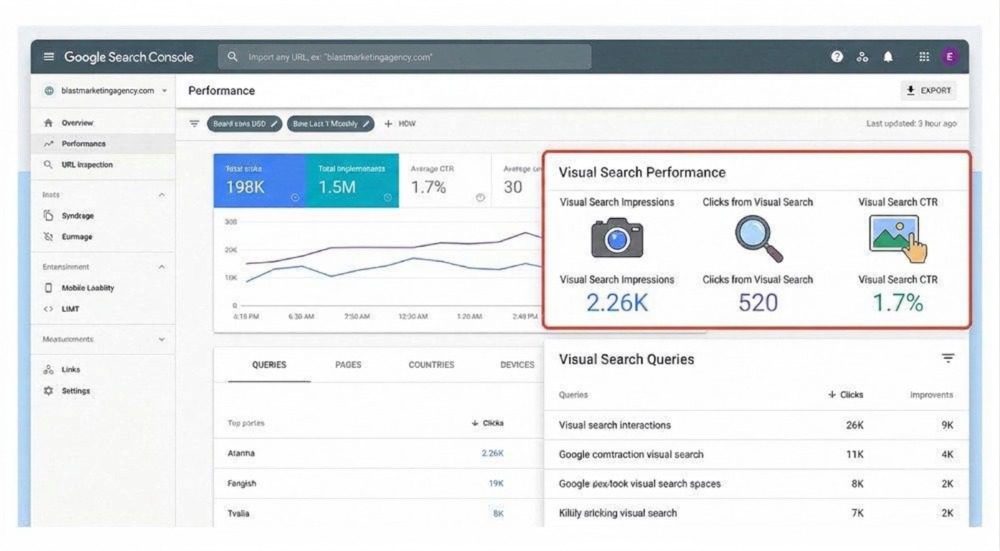
Google Search Console can now report how websites perform in multimodal searches, including Google Lens, Circle to Search, image uploads and Chrome’s “Search this image” feature.
The change, announced on September 24, 2026, gives publishers and marketers a clearer view of how visual discovery contributes to organic search performance. Google has added a new multimodal search-type filter to Search Console’s Performance reports, including reporting associated with generative AI features.
For teams developing a broader multimodal SEO strategy, this change is important because images can now be evaluated as measurable search assets rather than treated only as supporting page elements.
Briefly:
- Launch date: September 24, 2026
- Where: Google Search Console Performance reports
- Search experiences included: Lens, Circle to Search, image uploads and Chrome’s “Search this image”
- What changes for marketers: Visual discovery can now be analysed separately from conventional search activity
What changed in Google Search Console?
Google has introduced a multimodal search filter that isolates searches initiated with an image or visual interaction. According to Google, the reporting is rolling out globally and will appear when a site receives traffic from supported multimodal queries.
| Experience | What it represents |
| Google Lens | Searches initiated using an image or camera |
| Circle to Search | Visual searches started on supported Android devices |
| Image uploads | Images submitted directly to Google Search |
| Search this image | Visual searches initiated through Chrome |
This gives marketers a clearer way to measure traffic from Google Lens instead of just relying on estimates.
Teams already monitoring organic search performance and lead generation can now compare visual discovery with other search channels and identify pages that attract multimodal visibility.
What is multimodal search?
Multimodal search is a search experience that uses more than one form of input or context, such as images and text, to understand what a user wants.
A conventional query might begin with typed words. A multimodal query can begin with an object, product, landmark, screenshot, or photograph, and then use additional context to refine the result.
Google Lens search traffic can come from images and visual inputs, not just the keywords people type into search.
Why does Lens and Multimodal Search Tracking matter for SEO?
For businesses, the implications extend beyond image rankings. Product images, screenshots, diagrams, locations, before-and-after examples and other visually distinctive assets may help a page surface when the search starts with an image.
When it comes to generative AI search, Google also recommends supporting useful written content with relevant, high-quality images and videos. Established image and video SEO practices continue to matter in generative search experiences.
This can be especially relevant for local businesses in competitive markets in Manhattan, where physical locations, products, venues and recognisable visual details may influence discovery.
How do you find multimodal search data in Search Console?
The data is available through the Performance area of Search Console:
- Open the relevant Search Console property.
- Go to Performance.
- Select the appropriate reporting period.
- Open the Search type
- Choose multimodal search.
- Review performance by page, country, device and other available dimensions.
- Export the data when deeper comparison is required.
The aim should be to identify patterns rather than react to isolated changes. A better way to measure Google Lens SEO is to compare different time periods, page types, and image updates before drawing conclusions.
The same applies to a wider digital marketing and search strategy because one metric does not show the full picture.
How should you optimize for Google Lens and multimodal search?
There is no separate “Lens ranking trick.” The strongest approach is to make both the visual asset and its surrounding page easy to understand.
- Write useful alt text: Say what the image shows in plain language. Avoid repeating the same keywords across every image.
- Use clear image file names: A simple, descriptive file name can give search engines more context about the image.
- Make sure important images can be crawled: If Google cannot access an image, it cannot properly understand or show it in search.
- Add clear details on the page: Product names, locations, sizes, materials, people, and other specific details can help explain what the image is about.
- Use original visuals where possible: Screenshots, photos, diagrams, and comparisons can add more value than generic stock images.
These practices work better when they are part of a clear content strategy that connects related pages in a useful way.
What does the September 2026 spam update mean for visual-search content?
Google began rolling out its September 2026 spam update on September 24. It applies globally and across languages, with the rollout expected to take up to two weeks.
Visual and AI search should not be used as a reason to create lots of similar, low-value content.
Google defines scaled content abuse around the creation of many pages primarily intended to manipulate rankings while providing little original value, regardless of whether automation or generative AI produced them.
Sites should therefore avoid:
- Hundreds of near-identical visual-search landing pages;
- Pages built around minor query variations without distinct value;
- Scraped or lightly rewritten competitor content;
- Keyword-stuffed image alt text;
- Fabricated tests, experience or performance claims.
Google has also warned against creating separate pages for every possible query variation simply to influence Search or AI-generated results.
For websites that publish a lot of content, people-first SEO content is a better approach. Each page should offer original information, show real expertise, and have a clear purpose.
What should marketers measure now?
Start with metrics that answer the real questions:
- Multimodal impressions and clicks
- Pages receiving multimodal visibility
- Device and country patterns
- Changes following image improvements
- Pages appearing across both multimodal and generative search
- Engagement or conversions after visual-search visits
Avoid treating a single visual-search benchmark as universally good or bad. Performance will vary by industry, page type, and how visually searchable the subject is.
The bottom line
Search Console’s multimodal reporting makes visual discovery easier to measure.
The appropriate response is not to manufacture pages around every possible Lens query. It is to make genuinely useful pages visually understandable through original imagery, clear context, accurate entity information, and strong technical foundations.
Those principles support traditional SEO, multimodal discovery and AI search visibility without depending on tactics that conflict with Google’s spam policies.
Frequently Asked Questions
Does Google Search Console now show Google Lens traffic?
Yes. Google’s multimodal reporting includes searches involving Google Lens, Circle to Search, uploaded images, and Chrome’s “Search this image” feature.
Where can I find multimodal search data in Search Console?
Open the Performance report and use the multimodal search type filter. The data can also be exported for additional analysis.
Does Google Lens SEO require different ranking tactics?
Google has not published a separate Lens ranking formula that requires a new class of SEO tactics. Useful content, accessible high-quality imagery, descriptive context and established SEO practices remain the foundation.
Can AI-generated images or content hurt multimodal SEO?
Using AI is not automatically a spam violation. The risk increases when automation is used to create large volumes of low-value or unoriginal content primarily to manipulate search visibility.
How can businesses improve visibility in Google Lens?
Start with clear original images, accurate surrounding copy, descriptive alt text, crawlable assets and specific information about the people, products, locations or objects shown.